12/22
2025/12/22
Three.js
- glslでこっちを向いているかどうか
gl_FrontFacing - ジオメトリに穴を開ける
three-bvh-csg - glslで符号の入手 sign関数
- landを追加
htmlの実際のpxと同期
https://zenn.dev/bokoko33/articles/bd6744879af0d5 このページ参考
cameraに以下
const fovRad = (Camera.FOV / 2) * (Math.PI / 180);
const distance = this.config.height / (2 * Math.tan(fovRad));
camera.position.set(0, 0, distance);

const planeGeometry = new THREE.PlaneGeometry(800, 500, 100, 100)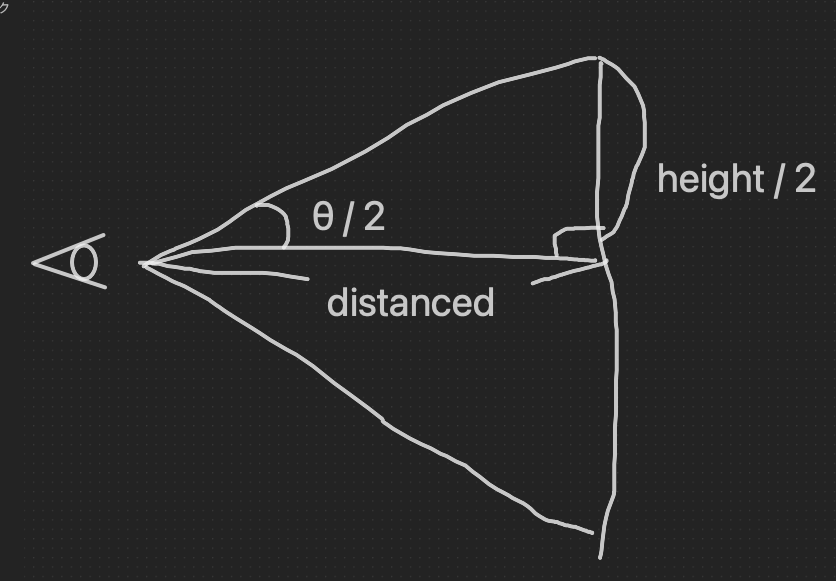
θにはfov。distanceをcamera.position.z。
planeGeometryの幅と高さは、実際にweb画面から見える幅と高さとなる。
実際の画像箇所にcanvasを配置
横並びのimg箇所や実際のページの画像がある箇所など、画像の位置(getBoundingClientRect)、幅と高さ、スクロール量を調べて配置し、img要素は透明に。
それを毎フレーム実行することで、canvasと画像の位置を同期できる。
r3fでこんな技術あったけど、ずっとどうやっていたんだって思ってた。謎が一つ解けた。
スクロールで変形
スクロールでplaneを変形する際、wheelのeventからホイールの速度を取っていたが、scroll量の現在値とターゲット値を決めて、その差分で変形させると良かったかも
update() {
 this.targetScrollY = window.scrollY;

 this.currentScrollY = this.lerp(
  this.currentScrollY,
  this.targetScrollY,
  0.2
 );

 this.scrollDiff = this.targetScrollY - this.currentScrollY;
}
fragmentの編集
こんな色の遊び方もあるのか。。。
float r = texture2D(uTexture, vUv).r;
float g = texture2D(uTexture, vUv).g;
float b = texture2D(uTexture, vUv).b;
vec3 textureColor = vec3(r, g, b);
上記のコードのようにしても普通に描画できる。
第二引数のvUv箇所をすこしずらすことで、面白い効果。
所感
https://three-training2.vercel.app/src/examples/20-transformplane/index.html
かなり良い例だった。要復習。
It was a pretty good example. Need to review.